A single YouTube lecture on machine learning can run two hours. A research video on a niche topic might contain one genuinely useful minute buried inside forty. Finding that minute by watching the whole thing is possible, but it is rarely the most efficient approach.
AI video summarizers extract the substance without requiring the full runtime, turning a transcript into a structured summary with key points and timestamped highlights in the time it would take to skip through the first chapter. That is the practical case for using one. The limits matter too, and this guide covers both.
Why Summarize a YouTube Video with AI
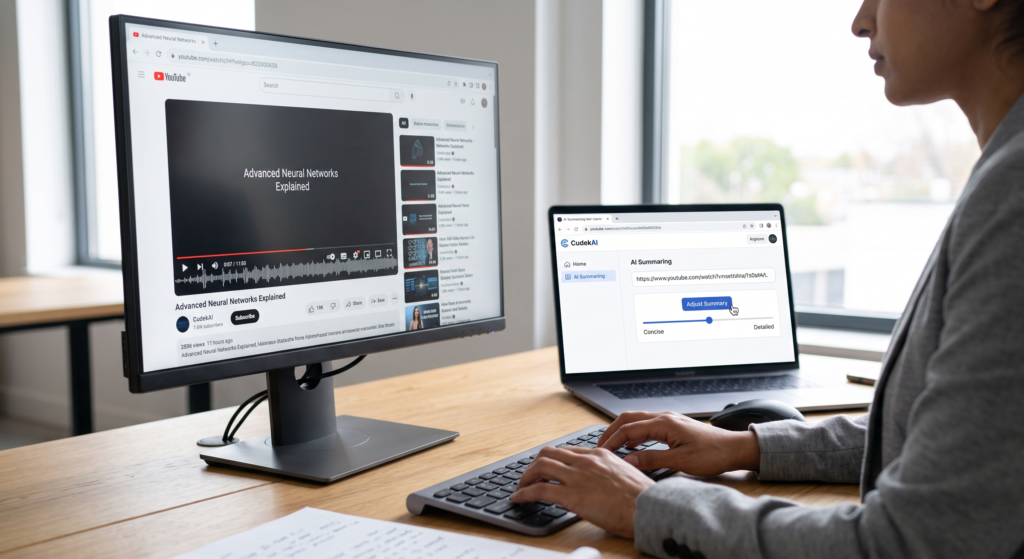
Most long YouTube videos are not uniformly valuable. A ninety-minute conference talk may contain fifteen minutes of material relevant to a specific question. A product review might answer a purchase decision in its third segment and spend the rest on tangents. Watching to find that section is efficient only when it justifies the runtime.
Summarization reverses the order: read the structured output first, then decide whether the full video is worth the time. Researchers use that approach to assess relevance before committing to a transcript review. Students use it to pre-read lecture content and identify what needs active note-taking. Professionals use it to stay current across conference talks and webinars without committing hours to each one.
How AI Video Summarizers Work
A typical video summarizer does not primarily process the moving image. It processes the words, using a transcript, caption file, or speech-to-text conversion as the raw material.
The process generally follows three stages:
- First, the audio is transcribed, either from the video’s existing caption file or by running the audio through a speech recognition system.
- Second, the transcript is parsed and segmented, identifying topic boundaries, repeated themes, and important moments such as section introductions and stated conclusions.
- Third, a language model compresses each segment while retaining its main points.
The output typically includes a full summary, a list of key takeaways, and sometimes timestamped chapter markers that let a reader jump to specific points in the original video.
Two important limitations follow from this process. Summary quality depends heavily on transcript accuracy. A video with an accurate caption file can produce a more reliable summary than one that relies on error-prone automated speech recognition, particularly for technical vocabulary, proper nouns, and non-native English speakers. Summaries are comprehensive, not evaluative. The AI identifies what the speaker said and condenses it. It does not assess whether the content is accurate, well-reasoned, or worth acting on.
How to Summarize a YouTube Video Step by Step
Summarizing a YouTube video takes under a minute once a tool is open.
- Copy the video URL from YouTube
The address bar URL works regardless of the video’s length.
- Paste it into a YouTube summarizer
The CudekAI YouTube Video Summarizer accepts a URL directly, processes the video’s transcript or audio, and generates a structured summary, key points, and adjustable granularity without requiring a login.
- Adjust the summary depth if needed
Most tools offer a choice between a short overview and a detailed breakdown. For research or study, a more granular output preserves more of the source material. For a quick decision about whether to watch, a concise version is faster to read.
- Review the output
Review the output against the video for anything that will be cited. For academic or professional use, any point that will appear in written work should be confirmed against the original before use.
For batch work, the CudekAI AI summarizer handles multiple links and playlists in a single session, supports videos up to twelve hours, and outputs summaries, transcripts, and translations across 46 languages. For teams that need to process video content at scale, API access is available for integrating the summarization pipeline directly into a workflow.
What to Do With the Summary

A summary is a starting point rather than an endpoint, and different use cases lead to different next steps.
For research
Read the summary to determine whether the video is a relevant source before committing to a full watch or a transcript review. If specific claims from the video will be cited, locate the timestamped moment in the original, watch that segment, and note the speaker, publication date, and channel for attribution. A summary establishes relevance; the original video establishes the claim.
For students incorporating video sources into essays, proper attribution and the avoidance of inadvertent plagiarism are as important as with written sources. CudekAI’s guide on how to avoid plagiarism in an essay covers citation methods, paraphrasing, and verification in academic contexts.
For studying
Use the summary as a pre-reading before a lecture or tutorial. Identifying the main structure in advance makes it easier to follow the full video and to know where to take detailed notes. After watching, the summary serves as a revision reference, and the key-points list helps identify which concepts need further review.
For professional use
Video summaries reduce the time spent staying current across a field. A summary of a conference talk or product announcement can be read in two minutes and flagged for a full watch if it contains something genuinely actionable. Many professionals summarize an entire playlist of relevant content and read through the outputs to identify the two or three videos that justify the time investment.
What AI Summarizers Get Wrong
Understanding the limits prevents the most common mistakes.
Implicit meaning is often lost
A speaker’s irony, a caveat buried in phrasing, or a point made through contrast rather than direct statement may not survive compression. The summary reflects what was said most explicitly, which is not always what was meant most importantly.
Technical and domain-specific content compresses Poorly
A tutorial that builds incrementally across twelve steps will produce a summary that lists the steps without the reasoning connecting them. The summary of a coding video looks complete and may not be usable without the video.
Low-quality captions produce low-quality summaries
Videos relying on auto-generated captions in a technical domain, with a non-native speaker, or recorded in poor audio conditions will have transcription errors that carry through into the summary. The output will be fluent but may contain wrong terms, mangled names, or missing figures.
The summary cannot evaluate the source
A confident but inaccurate speaker produces a confident-sounding summary. This matters most in research contexts, where a well-produced video on a contested topic may be summarized as more authoritative than the underlying content warrants. Reading the summary does not replace reading the literature.
When a Summary Is Enough and When It Is Not
The honest answer depends on what the video will be used for.
A summary is generally sufficient when the goal is deciding whether to watch. If the summary does not surface anything relevant, the video is unlikely to either. When the goal is staying informed about an industry topic or tracking a recurring speaker’s positions, summaries work well as a filtering layer above the full content.
A summary is not sufficient when the video will be directly quoted or cited. Academic and professional writing that attributes a claim to a video needs the source, not a compressed version of it. The same applies when a tutorial needs to be followed step by step, when a legal or medical claim is involved, or when the accuracy of a specific number or statement matters.
For anyone using video content to produce written work, the question of whether that work includes original research, paraphrase, or summarized ideas connects to academic integrity in the same way as other sources. CudekAI’s Plagiarism Checker identifies matches between submitted work and existing sources, including content derived from online video transcripts that have appeared in other published material.
FAQs
Does the tool need me to log in to summarize a YouTube video?
No. The CudekAI YouTube Video Summarizer does not require a login for standard use. Paste the URL, and the summary generates directly.
Can it summarize videos in languages other than English?
Yes, the CudekAI summarizer supports video summarization and translation across 46 languages through CudekAI AI Translator. For non-English videos, it can generate a summary in the original language or translate the summary into English, depending on the selected output.
What happens if the video has no captions?
The tool uses speech-to-text processing when captions are unavailable. Output quality is generally high for clearly recorded audio, though videos with strong accents, heavy background noise, or dense technical vocabulary may produce less accurate summaries.
Is it accurate enough to use for academic research?
For a first-pass assessment of relevance, yes. For citing specific claims, no. Any point that will appear in academic writing should be verified against the original video, including the specific timestamp, because a summary compresses the source and may omit nuance.
Can it handle long videos such as full lectures or conference talks?
Yes. The CudekAI YouTube Video Summarizer supports videos up to twelve hours in length, which covers full conference keynotes, multi-hour tutorials, and complete course lectures.
Does summarizing a video replace watching it?
For most casual and professional purposes, the summary can replace the need to decide whether the video is worth watching, but not the video itself. For any use case that depends on the source, the full video remains the authoritative reference.